Tuesday, February 27, 2007
Koop "vrienden" voor 99 cent
Dat de social networking sites de laatste tijd nogal een hype zijn en behoorlijk uit de hand lopen wisten we al. Maar dat je tegenwoordig, mocht je geen aanzienlijk "vrienden" lijstje hebben, deze "vrienden" kunt kopen dat slaat echt alles.

Sunday, February 25, 2007
Bluetooth on Ubuntu Linux
Recently I borrowed a Bluetooth USB stick from a friend of mine, just to try if I could get it working on Ubuntu. My friend bought this stick at MediaMarkt for 13 euros, it has no brand on the package just the name Qtrek on the stick itself. And it's pretty small.
So I plugged in the stick and typed in "lsusb" on the console to see what kind of chipset it had. On the console it said:
turns out this chipset is well supported on Linux, immediately a red light in the stick started to blink.
How it works now:
The first thing I tried was sending a file with my phone, it found my computer as "zaphod-0", I didn't have to do anything for this, it just was there.
When I wanted to send the file it failed however.
On the blog of Pascal de Bruijn I read about his experience with Bluetooth and also read he installed the "gnome-bluetooth" package. I followed his example and a new application called "Bluetooth File Sharing" appeared in my "Applications -> Accessories" menu.
By starting this application a nice little icon appears in the notification area (system tray). So again I tried to send a picture from my mobile phone, and all of a sudden this dialog popped up:
 Since "Arthur Dent" is the bluetooth identification of my phone, I knew it worked, so I pressed the "OK" button and waited. Now the progressbar on my phone started to work and also the icon in the notification area starts an animation, and after a while this dialog appeared:
 Then I knew the file was transferred, and there it was on my desktop. Worked like a charm. Well actually there were some humps and bumps, but once I fixed those it works exactly like I told above.
What really happened:
At first when I started the "Bluetooth File Sharing" application and wanted to send a file from my phone it failed. So I grabbed my sister's phone an LG KG800 and from there I tried to send a picture, and immediately it worked.
If you experience problems with this file sharing you can start the "Bluetooth File Sharing" application from the console by using the following command:
whenever something happens on the bluetooth connection debug messages are printed to the console, a succesfull transfer should look like this:
Between the "** Message: Device ..." and "** Message: File arrived ..." the file is actually being transferred, so it can take a while for the lather to show up.
When I tried to send from my phone I only got to "** Message: Device ..." and then my phone told me the transfer failed. Since I am used to problems with my phone I gave it a good old reboot, and that did the trick, now it works like it should.
Tip of the day: Never ever buy a Nokia N70, cause it sucks in everything, bigtime, thanks Nokia.
So I plugged in the stick and typed in "lsusb" on the console to see what kind of chipset it had. On the console it said:
ID 0a12:0001 Cambridge Silicon Radio, Ltd Bluetooth Dongle (HCI mode)
turns out this chipset is well supported on Linux, immediately a red light in the stick started to blink.
How it works now:
The first thing I tried was sending a file with my phone, it found my computer as "zaphod-0", I didn't have to do anything for this, it just was there.
When I wanted to send the file it failed however.
On the blog of Pascal de Bruijn I read about his experience with Bluetooth and also read he installed the "gnome-bluetooth" package. I followed his example and a new application called "Bluetooth File Sharing" appeared in my "Applications -> Accessories" menu.
By starting this application a nice little icon appears in the notification area (system tray). So again I tried to send a picture from my mobile phone, and all of a sudden this dialog popped up:
 Since "Arthur Dent" is the bluetooth identification of my phone, I knew it worked, so I pressed the "OK" button and waited. Now the progressbar on my phone started to work and also the icon in the notification area starts an animation, and after a while this dialog appeared:
 Then I knew the file was transferred, and there it was on my desktop. Worked like a charm. Well actually there were some humps and bumps, but once I fixed those it works exactly like I told above.
What really happened:
At first when I started the "Bluetooth File Sharing" application and wanted to send a file from my phone it failed. So I grabbed my sister's phone an LG KG800 and from there I tried to send a picture, and immediately it worked.
If you experience problems with this file sharing you can start the "Bluetooth File Sharing" application from the console by using the following command:
/usr/bin/gnome-obex-server
whenever something happens on the bluetooth connection debug messages are printed to the console, a succesfull transfer should look like this:
conn_request: bdaddr 00:17:4B:1D:0B:E9
conn_complete: status 0x00
** Message: Incoming connection from 00:17:4B:1D:0B:E9
** Message: Device 00:17:4B:1D:0B:E9 is about to send an object.
** Message: File arrived from 00:17:4B:1D:0B:E9
** Message: Filename '200702171898.jpg' Length 308934
** Message: Saving to '/home/lgespee/Desktop/200702171898.jpg'
Between the "** Message: Device ..." and "** Message: File arrived ..." the file is actually being transferred, so it can take a while for the lather to show up.
When I tried to send from my phone I only got to "** Message: Device ..." and then my phone told me the transfer failed. Since I am used to problems with my phone I gave it a good old reboot, and that did the trick, now it works like it should.
Tip of the day: Never ever buy a Nokia N70, cause it sucks in everything, bigtime, thanks Nokia.
Friday, January 26, 2007
Linux Apple Airport Express Support
Well it's a little bit late, but this post is a reaction to three posts Stephan Kochen about streaming audio from the GStreamer framework tomade by an Apple Airport Express. (Post 1, Post 2, Post 3).
More than a month ago I was looking for a GStreamer sink that would stream audio player by the GStreamer framework to an Apple Airport Express.
I couldn't find anything, the only thing I found was JustePort by Jon Lech Johansen. And a certain Bash script.
 I got it working more or less. What I did was create an ALSA sink, so it would write all data it received to a file (actually a FiFo). The Bash script I found would then be started and in a infinite loop keep reading data from the FiFo and pipe it to JustePort.
It worked, well I got sound on my speakers (which are connected to an amp. which is connected to the Apple Airport Express). The problems and/or limitations I experienced were:
 The best thing would indeed be a GStreamer sink plugin for this. So Stephan just to let you know, there are other people (even in your province) that are interested in this.
Now I am not a really great programmer on these kind of systems (too hardware oriented I'm afraid) but maybe I can help you in some way.
I think the best thing to do is to get something small to work first like detect if a Jack is plugged into the Airport's socket. And then from thereon continue implementing more complicated things.
Let me know if I can help you in any way, cause I have two of these babies at home, so I have a testbed.
More than a month ago I was looking for a GStreamer sink that would stream audio player by the GStreamer framework to an Apple Airport Express.
I couldn't find anything, the only thing I found was JustePort by Jon Lech Johansen. And a certain Bash script.
 I got it working more or less. What I did was create an ALSA sink, so it would write all data it received to a file (actually a FiFo). The Bash script I found would then be started and in a infinite loop keep reading data from the FiFo and pipe it to JustePort.
It worked, well I got sound on my speakers (which are connected to an amp. which is connected to the Apple Airport Express). The problems and/or limitations I experienced were:
- A crash of the music player the first play you want to start playing a song with this construction. Restarting the music player and trying again always worked.
- An irritating buzz when the FiFo was empty (the player was paused, or the gap in between songs).
- The horrid construction and actions that need to be taken to get it working each time.
- And of course the fact that all sound in Linux that was player over ALSA would be outputted to my speakers.
 The best thing would indeed be a GStreamer sink plugin for this. So Stephan just to let you know, there are other people (even in your province) that are interested in this.
Now I am not a really great programmer on these kind of systems (too hardware oriented I'm afraid) but maybe I can help you in some way.
I think the best thing to do is to get something small to work first like detect if a Jack is plugged into the Airport's socket. And then from thereon continue implementing more complicated things.
Let me know if I can help you in any way, cause I have two of these babies at home, so I have a testbed.
Sunday, January 07, 2007
From Sysvinit to Upstart = -12 seconds
A few days ago I reinstalled my Ubuntu Linux PC. I was still using Ubuntu 6.06 Dapper Drake but decided to install Ubuntu 6.10 Edgy Eft since I had no problems with it on my laptop.
I am always a bit reluctant about upgrades so I decided to completely reinstall the system. But before I did I clocked my boot time under Dapper Drake (which uses Sysvinit), from pressing the power button on my PC till the GDM login screen took 67 seconds.
Then I installed Edgy Eft and installed all the applications I previously used and got the settings back (had some troubles with Evolution) and then clocked again. This time from pressing the power button till the GDM login screen took 55 seconds. Upstart gave an improvement of 12 seconds, that's pretty much I think.
I am always a bit reluctant about upgrades so I decided to completely reinstall the system. But before I did I clocked my boot time under Dapper Drake (which uses Sysvinit), from pressing the power button on my PC till the GDM login screen took 67 seconds.
Then I installed Edgy Eft and installed all the applications I previously used and got the settings back (had some troubles with Evolution) and then clocked again. This time from pressing the power button till the GDM login screen took 55 seconds. Upstart gave an improvement of 12 seconds, that's pretty much I think.
Friday, January 05, 2007
Is it a birdie? Is it an Eagle? Is it an Albatros?
No! It's a hole in one!
Uh, well okay, let me explain that. Yesterday I went to Dennis together with Pascal and Ivo, cause Dennis and Pascal both had their birthdays somewhere in the Christmas-holiday and they decided to have a little party. Well actually they decided we all should come play with Dennis' new Nintendo Wii.
An absolutely fabulous idea if you ask me.
We played the games that come packed with the Wii, Bowling (in which I pretty sucked), Tennis, Boxing, Baseball and Golf. Dennis also downloaded (bought) Bomberman from the Wii online shop system, and we played it for some time, a lot of retro fun.
To get back to the title of this post, in the golf game I got a hole in one at Hole 4, the total par of the 9-hole was 36 and I got 36 ;).

And for the insiders something worth mentioning is that Dennis got beaten by Pascal.
Another post about the Nintendo Wii will follow soon.
Uh, well okay, let me explain that. Yesterday I went to Dennis together with Pascal and Ivo, cause Dennis and Pascal both had their birthdays somewhere in the Christmas-holiday and they decided to have a little party. Well actually they decided we all should come play with Dennis' new Nintendo Wii.
An absolutely fabulous idea if you ask me.
We played the games that come packed with the Wii, Bowling (in which I pretty sucked), Tennis, Boxing, Baseball and Golf. Dennis also downloaded (bought) Bomberman from the Wii online shop system, and we played it for some time, a lot of retro fun.
To get back to the title of this post, in the golf game I got a hole in one at Hole 4, the total par of the 9-hole was 36 and I got 36 ;).

And for the insiders something worth mentioning is that Dennis got beaten by Pascal.
Another post about the Nintendo Wii will follow soon.
Monday, September 25, 2006
Gnome-VFS is getting old
Alexander Larrson (RedHat) has been a developer and maintainter of Gnome-VFS for a while now.
He said in this mail a few days back, that he thinks it's time to replace Gnome-VFS.
Gnome-VintageFileSystem
While the idea behind Gnome-VFS is bloody briliant, its architecture and other stuff are getting old. I sure hope the replacement will be good, but I don't really doubt about that.
He said in this mail a few days back, that he thinks it's time to replace Gnome-VFS.
Gnome-VintageFileSystem
While the idea behind Gnome-VFS is bloody briliant, its architecture and other stuff are getting old. I sure hope the replacement will be good, but I don't really doubt about that.
Saturday, September 02, 2006
Teardown
In all the excitement of Upstart by Scott James Remnant, you might have forgotten this other project by the same guy, Teardown.
The target of Teardown is best described with the usecase on the Teardown wiki page:
What it actually does, is remove all redundant and unnecessary symlinks to init scripts in the rc directories. Most scripts only send a TERM signal to their corresponding processes while this is also done by sendsigs. So most of them are redundant. On the teardown wikipage you can find a list of init scripts the developers found where only sending a TERM signal or doing nothing at all!
To those who are thinking, "What the **** is TERM signal?", Teardown just makes your computer shutdown within a few seconds (read: very fast compared to the current shutdown process).
The target of Teardown is best described with the usecase on the Teardown wiki page:
Matt is a laptop user, when he shuts down his laptop he doesn't want to have to wait for almost a minute before the laptop has actually powered off.
What it actually does, is remove all redundant and unnecessary symlinks to init scripts in the rc directories. Most scripts only send a TERM signal to their corresponding processes while this is also done by sendsigs. So most of them are redundant. On the teardown wikipage you can find a list of init scripts the developers found where only sending a TERM signal or doing nothing at all!
To those who are thinking, "What the **** is TERM signal?", Teardown just makes your computer shutdown within a few seconds (read: very fast compared to the current shutdown process).
Tuesday, August 29, 2006
1 Ubuntu user + 1 Ubuntu user = 2 Ubuntu users
Help the Ubuntu counter, add yourself and your machines running Ubuntu, to the Ubuntu counter project.
I am Ubuntu user #7442:

I am Ubuntu user #7442:
Thursday, August 24, 2006
Beagle a dog I like & Rhythmbox or Banshee
Beagle a dog I like

As I told you, I reinstalled my Ubuntu PC a few days ago, and since I had some bad experience with Beagle destroying my filesystem in the past, I didn't use it on my old install. But today I gave it another shot, since a lot has happened for Beagle between the old and the new Ubuntu.To be honest, I don't like dogs so much, but this one, man do I like it. Now I can't imagine how I could have ever lived without it. Really great.
Rhythmbox or Banshee
A struggle continuing on my desktop is the choice between Banshee and Rhythmbox, I still can't decide which one is going to be my default player. In the near future I am going to write a comparison from my point of view with the advantages and disadvantages, in my opinion, of the two competitors.

As I told you, I reinstalled my Ubuntu PC a few days ago, and since I had some bad experience with Beagle destroying my filesystem in the past, I didn't use it on my old install. But today I gave it another shot, since a lot has happened for Beagle between the old and the new Ubuntu.To be honest, I don't like dogs so much, but this one, man do I like it. Now I can't imagine how I could have ever lived without it. Really great.
Rhythmbox or Banshee
A struggle continuing on my desktop is the choice between Banshee and Rhythmbox, I still can't decide which one is going to be my default player. In the near future I am going to write a comparison from my point of view with the advantages and disadvantages, in my opinion, of the two competitors.
Wednesday, August 23, 2006
Help Firefox win the battle
Help Firefox win the battle against Internet Explorer. This time not by reporting bugs, helping developers, promote it amongst friends and family.

But with a plain old game of checkers, go play.

But with a plain old game of checkers, go play.
Vote for your Linux preferences
DesktopLinux.com launched its 2006 Desktop Linux survey on August 21, asking users of Linux desktops to identify what distributions they use, as well as their choice of windowing environment (KDE, GNOME, etc.), web browsers, email clients, and Windows-on-Linux solutions.
Well I think it might be a good idea to tell DesktopLinux.com about your preferences, so go vote now!
Monday, August 21, 2006
Long time, no blog - Some time, long blog
Well it has been over almost two months since my last blog post.
I've been busy with all kinds of things, working, helping charity, having vacation, partying. But I thought it was time to add another post to my blog.
Two days ago I reinstalled my Ubuntu PC. I was still using an install which originated from an early beta, which I updated to another beta. Then I installed XGL using one of the nastiest methods and updated to another beta and finnaly to the stable after that.
Well the system was all sluggish and instable because of my crappy XGL install. So I decided it was time for a reinstall. And woopidoo, does this baby run like a charm now. This time without XGL.
I changed the human window theme because I was bored of it and I still affiliated the caramel color with a sluggish system :).
While browsing through the themes that come standard with every Ubuntu install I found one called Silicon, and man do I like it. I especially like the colors (grayish brown) of the title bar and the nice buttons on it, and of course the "not rounded shape" of the window borders.
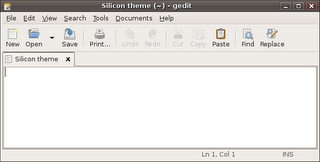
Of course I was also bored with the fancy shining orange folder icons. So I decided to go with the Tango icon theme on which the Human icon theme is based. The button icons are almost all the same, and it has some nice mat blue colored folder icons.
The next day a friend of mine called me, and we were talking about some things and at one moment he said: "Oh by the way I just installed Ubuntu on a PC I had spare.". Ofcourse I was totally flabbergasted, because I didn't expect him to, so the duration of the phonecall got extended a bit (1.5 hours). I explained a lot of things, from where Linux comes from, where the Canonical gets its funds, who Mark Shuttleworth is, what philosophy drives most opensourcers have, how the community takes part in all this, etc, etc.
He got more and more interested and maybe Ubuntu has another (parttime) user. At one point in the conversation he asked me what KDE was and to what he could compare it (of all the things I told him). Well saying he could compare it with Gnome here would be a plain lie :). So my answer was: "Rommel" (Garbage). I told him it's a desktop environment like Gnome is, and explained him some of the differences. After like two sentences he was completely cured from the KDE idea.
While I was argumenting why Gnome and especially GTK are so great (although he is not an IT person, but a technician nonetheless), I got excited about using GTK again myself. So I decided to install MonoDevelop.The last version of MonoDevelop I installed, on my old Ubuntu install, was I believe a 0.8 and it lacked a lot of things one needs. But the 0.10 shipped with Ubuntu 6.06 Dapper Drake is pretty good, it lacks some things, but it is absolutely useful.
I'll wrap it up because this post is getting pretty long. Probably Ubuntu is getting another user, the father of one of my collegues is willing to give Ubuntu a shot. So I'm going to install Ubuntu on his PC coming thursday and friday and he will try it for a while and then decide to keep on using it, or maybe reverting back to Windows. One advantage is he is very open minded for inovation. He might just love Ubuntu ;).
To prevent these long posts in the future I will try to make some time to at least blog once every week.
I've been busy with all kinds of things, working, helping charity, having vacation, partying. But I thought it was time to add another post to my blog.
Two days ago I reinstalled my Ubuntu PC. I was still using an install which originated from an early beta, which I updated to another beta. Then I installed XGL using one of the nastiest methods and updated to another beta and finnaly to the stable after that.
Well the system was all sluggish and instable because of my crappy XGL install. So I decided it was time for a reinstall. And woopidoo, does this baby run like a charm now. This time without XGL.
I changed the human window theme because I was bored of it and I still affiliated the caramel color with a sluggish system :).
While browsing through the themes that come standard with every Ubuntu install I found one called Silicon, and man do I like it. I especially like the colors (grayish brown) of the title bar and the nice buttons on it, and of course the "not rounded shape" of the window borders.
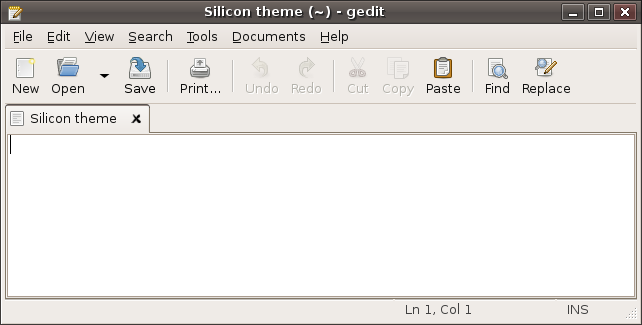
Of course I was also bored with the fancy shining orange folder icons. So I decided to go with the Tango icon theme on which the Human icon theme is based. The button icons are almost all the same, and it has some nice mat blue colored folder icons.
The next day a friend of mine called me, and we were talking about some things and at one moment he said: "Oh by the way I just installed Ubuntu on a PC I had spare.". Ofcourse I was totally flabbergasted, because I didn't expect him to, so the duration of the phonecall got extended a bit (1.5 hours). I explained a lot of things, from where Linux comes from, where the Canonical gets its funds, who Mark Shuttleworth is, what philosophy drives most opensourcers have, how the community takes part in all this, etc, etc.
He got more and more interested and maybe Ubuntu has another (parttime) user. At one point in the conversation he asked me what KDE was and to what he could compare it (of all the things I told him). Well saying he could compare it with Gnome here would be a plain lie :). So my answer was: "Rommel" (Garbage). I told him it's a desktop environment like Gnome is, and explained him some of the differences. After like two sentences he was completely cured from the KDE idea.
While I was argumenting why Gnome and especially GTK are so great (although he is not an IT person, but a technician nonetheless), I got excited about using GTK again myself. So I decided to install MonoDevelop.The last version of MonoDevelop I installed, on my old Ubuntu install, was I believe a 0.8 and it lacked a lot of things one needs. But the 0.10 shipped with Ubuntu 6.06 Dapper Drake is pretty good, it lacks some things, but it is absolutely useful.
I'll wrap it up because this post is getting pretty long. Probably Ubuntu is getting another user, the father of one of my collegues is willing to give Ubuntu a shot. So I'm going to install Ubuntu on his PC coming thursday and friday and he will try it for a while and then decide to keep on using it, or maybe reverting back to Windows. One advantage is he is very open minded for inovation. He might just love Ubuntu ;).
To prevent these long posts in the future I will try to make some time to at least blog once every week.
Monday, June 26, 2006
Je kunt zeggen van Belgen wat je wil
Thursday, May 25, 2006
True Hitchhiker
Happy Towel Day!
"...any man who can hitch the length and breadth of the galaxy, rough it, slum it, struggle against terrible odds, win through, and still knows where his towel is, is clearly a man to be reckoned with." - Douglas Adams, The Hitchhiker's Guide to the Galaxy Check out Dennis' Towel Day entry!

R.I.P. Douglas Adams
"...any man who can hitch the length and breadth of the galaxy, rough it, slum it, struggle against terrible odds, win through, and still knows where his towel is, is clearly a man to be reckoned with." - Douglas Adams, The Hitchhiker's Guide to the Galaxy Check out Dennis' Towel Day entry!

R.I.P. Douglas Adams
Wednesday, May 24, 2006
Tomorrow is the day
As I informed all of you almost a month ago, the big day is tomorrow.
Because most (if not all) of the shops in The Netherlands will be closed tomorrow, I hereby inform you to go get a towel today if you don't have one ;)
Because most (if not all) of the shops in The Netherlands will be closed tomorrow, I hereby inform you to go get a towel today if you don't have one ;)
Tuesday, May 09, 2006
80s Videoclips
The fact that the 80s probably produced the most awkward music videos of all time isn't anything new.
But today I found one from Finnish origin on Google Video that just beats the rest in every aspect. I had to laugh out loud, especially about the background dancers.
The 80s, what a wonderfull era.
But today I found one from Finnish origin on Google Video that just beats the rest in every aspect. I had to laugh out loud, especially about the background dancers.
The 80s, what a wonderfull era.
Friday, May 05, 2006
One way or another
If Microsoft Office doesn't come to ODF, then ODF will come to Microsoft Office.
[commercial]
If you don't like plug-ins, use a better Office suite, like OpenOffice.org.
[/commercial]
[commercial]
If you don't like plug-ins, use a better Office suite, like OpenOffice.org.
[/commercial]
Friday, April 28, 2006
Package Mayhem
Today I found a little bug in gnome-about-me, the application used to set all personal data of a user (Name, Address, etc). I didn't find a package on launchpad that said gnome-about-me, so I posted it under gnome-desktop.
And as you can read in the comments on the bugreport I got a wonderful tip I found valuable enough to blog about ;)
Sebastien Bacher:
Type "dpgk -S " followed by a binary name, and you will get the name of the package containing it.
Simply Great.
Update: Read the comments for some really useful tips by "Anonymous".
And as you can read in the comments on the bugreport I got a wonderful tip I found valuable enough to blog about ;)
Sebastien Bacher:
Thanks for your bug. About the right package:
$ dpkg -S gnome-about-me
...
gnome-control-center: /usr/bin/gnome-about-me
...
Type "dpgk -S " followed by a binary name, and you will get the name of the package containing it.
Simply Great.
Update: Read the comments for some really useful tips by "Anonymous".
Wednesday, April 19, 2006
Edgy ...
Today the name for the Ubuntu Dapper +1 release has been published.
It will be "Edgy Eft".
And know what, I dislike it, I don't want a reptile I want a fish.
Anyone interested in a petition for "Edgy Eel"?
I just like the sound of that.
It will be "Edgy Eft".
And know what, I dislike it, I don't want a reptile I want a fish.
Anyone interested in a petition for "Edgy Eel"?
I just like the sound of that.
Microsoft Internet Explorer being more correct than Firefox
To give some credit to the Microsoft Internet Explorer developers, after bashing them in my last post, I thought it was fair to post the following discovery.
I was making a form in HTML, but it showed up in MSIE with some space above and beneath it. Ofcourse my reaction was, "oh no, not again" (just like the bowl of petunias).
Looking into the subject deeper I made a shocking discovery. The MSIE developers are actually more correct here than the Firefox (Gecko engine) developers. Not that the lather are wrong, the MSIE ones are just more correct.
As can be read in this W3 encouragement, developers should give the <form> element the following CSS option by default: "margin: 1.33em 0". Which tells us the form should have a default margin to its top and botton of 1.33em.
I can tell you one thing, I was flabbergasted ;)
I was making a form in HTML, but it showed up in MSIE with some space above and beneath it. Ofcourse my reaction was, "oh no, not again" (just like the bowl of petunias).
Looking into the subject deeper I made a shocking discovery. The MSIE developers are actually more correct here than the Firefox (Gecko engine) developers. Not that the lather are wrong, the MSIE ones are just more correct.
As can be read in this W3 encouragement, developers should give the <form> element the following CSS option by default: "margin: 1.33em 0". Which tells us the form should have a default margin to its top and botton of 1.33em.
I can tell you one thing, I was flabbergasted ;)
Subscribe to:
Posts (Atom)

